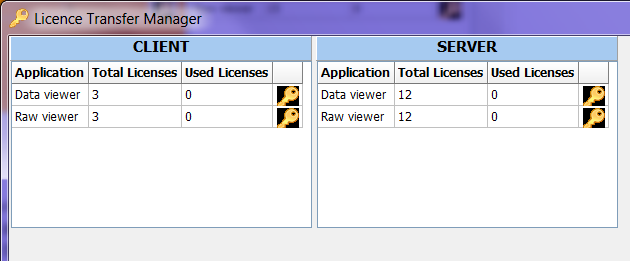
License Transfer Manager
Licenses are used in Aurora applications. The License Transfer Manager allows the user to transfer a licenses that would typically be used to a remote system. This is useful for a client who is taking a system off site and wont have access to the main servers with all the data on them, but still wants to be able to do analysis.
- To use License Transfer Manager have the client machine connected to the same GREEN network as the Server that you would like to pull the licences from.
- With all the analysis software with the exception of AuroraClient running on both machines, launch Licence Transfer Manager.
- You should see the Test Cell names for all computers on the GREEN network currently running analysis servers with total number of licences listed as well as current number of licences in use, in this example the test cell names are Client and Server. The Current Number in use corresponds to the number of AuroraClients currently connected to those Analysis Servers ie. Dataviewer Server or Rawviewer Server.
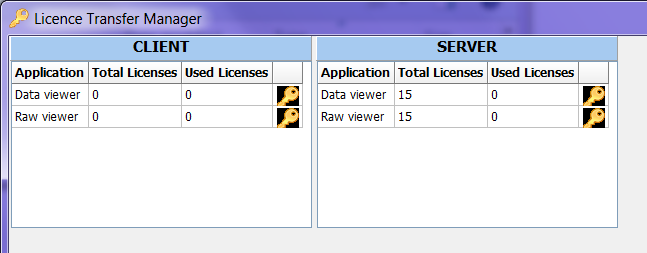
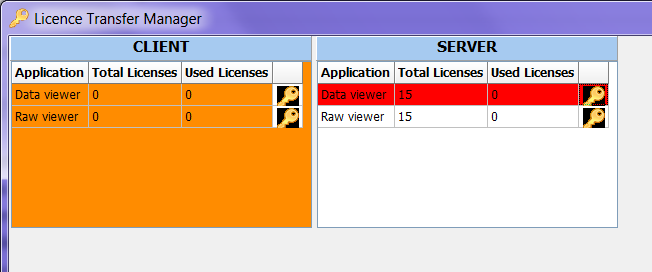
- To transfer licences click on the key icon of the source system for the service you would like to transfer licences from, when clicked it will highlight the service red. Then click on the destination system you would like to transfer licences to, when the mouse is hovering over the destination it will turn orange.
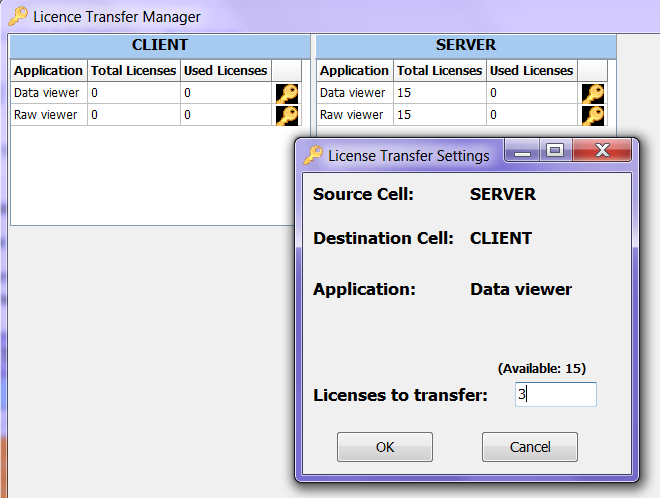
- A pop up box will appear and ask how many licences you would like to transfer. The number of licences a system needs depends on how many Aurora Clients are going to potentially connect to the it at any one time. If the system will be a stand alone laptop with 1 aurora connecting to it then only one licence will be need to be transferred. After selecting the number of licences to transfer select OK.
- When you have all the licences transferred that you would like. Launch Aurora and you are done.