
Analysis Types
Analysis within the HGL architecture is intended to be repeatable and consistent regardless of the user creating the analysis file. There are some options available, and all analysis options are preserved in viewing the post processed file. Detailed below are the options available to users.
HGL's analysis software has some requires access to the main database which tracks which files are available. Performing analysis is not possible without a full system connection (Database with files stored in the expected location, Aurora servers, and the processing engines).
Analysis files are always associated to a manoevure. If the recording does not have a manoeuvre, it is necessary for users to create a manoeuvre.
Analysis jobs are always submitted as a group map and proc spec combination and are designed for batch submission. Rapid processing automates the creation of GM / PS combinations, but it is still the same fundamental process.
HGL creates two basic types of post processed files: ZMod (zm), a frequency based file, and a Time History (th) file.
A ZMod file is comprised up to 28 channels with each channel having 360 evenly spaced FFTs covering the duration of the specified analysis window. Zmods can be down sampled or band-pass filtered. Each FFT is always a 1k Hanning FFT of the analysis window sample rate and will result in different bin sizes for the frequency resolution. How each FFT is determined is based on the type of ZMod analysis chosen.
A Time History file is also comprised of up to 28 channels and has the option to be down sampled, or band pass filtered, based on the main acquisition sample rate (all data
The different Analysis Types are used in Proc Spec Editor and Tornado.
- Standard ZMOD *
- Advanced ZMOD's *
- Bin-by-bin Max Peak ZMOD
- Average Spectra ZMOD
- Spectrum with Max Energy ZMOD
- Spectrum with Max Peak ZMOD
- EASIFIT
- Reference
- Tacho Order Generation
- Time History
* For a visual example of each of the different ZMod types and how they effect the processing results click here
Standard ZMOD
This option is the main frequency domain analysis option, generating files which hold spectral data taken at 360 even intervals of a reference quantity (e.g. time or speed) during an event or manoeuvre. This option does not necessarily investigate all available input data. Instead, it obtains individual chunks of data at time periods selected automatically via the reference quantity. For all but the shortest events, these chunks are unlikely to overlap. This option is of particular use when massive amounts of data must be analysed as rapidly as possible, and users are confident that no sudden events could occur in the data between neighbouring chunks.

1. Power Factor: Peak / Pk-Pk / RMS
2. Output Type: Real / Complex
3. Reference Channel: Time / N1, N2 or N3 (that is, any of the tacho channels representing shaft 1, 2 or 3) / Named Ref Channel
4. Option for selecting one of the units available for the selected Reference Channel ( note: if the reference is Time, then unit “seconds” represents the number of seconds from the start of the manoeuvre being analysed, and unit “% Time” is a percentage of the manoeuvre duration).
5. (Optional) Param Chan 1 Name: Name of a low-sample rate channel included in another Channel Group (within the current Proc Spec) for which a processing has been defined with parameter Analysis Type set to Reference.
6. (Optional) Param Chan 2 Name: Name of a second low sample-rate channel included in another Channel Group (within the current Proc Spec) for which a processing has been defined with parameter Analysis Type set to Reference.
7. Analysis Frequency: For specifying the analysis bandwidth of interest.
8. Ref Limits: For specifying the reference range of interest. The reference values to enter are to express in the selected reference unit (parameter 4)
Advanced ZMOD types
Apart from the Standard ZMOD analysis, all other ZMOD methods analyse all available input data within the reference (time/speed) range of interest, even though the generated file contains a limited number of output spectra: the reference range will be evenly divided into that number of ranges, and each output spectrum will be constructed by analysing all individual input spectra within the corresponding reference range. Only the method used for constructing the output spectra will differ based on the selected Analysis Type.
For a given reference range:
- Bin-by-bin Max Peak ZMOD The output spectrum is constructed by taking the highest amplitude observed at each separate frequency bin across all input spectra in the reference range. As a result, the output spectrum does not represent a true spectrum obtained from any single input spectrum.
- Average Spectra ZMOD The output spectrum is constructed by taking the average amplitude observed at each frequency bin across all input spectra in the reference range. As a result, the output spectrum does not represent a true spectrum obtained from any single input spectrum.
- Spectrum with Max Energy ZMOD The output spectrum is constructed by taking the input spectrum with the highest total amplitude (as measured by summing the amplitudes across all frequency bins) across all input spectra in the reference range. This means that the output spectrum represents a true input spectrum.
- Spectrum with Max Peak ZMOD The output spectrum is constructed by taking the input spectrum with the highest peak amplitude at an individual frequency across all input spectra in the reference range. This means that the output spectrum represents a true input spectrum.
The parameters for advanced ZMOD analyses (also called ungapped ZMOD analyses) are the same as for the Standard ZMOD analysis type.
EASIFIT
This option generates time domain analysis data in a commutative frame format, and is suitable only for low bandwidth data. The EASIFIT format is used internally by several clients, and it is not expected to be of use to clients who do not already support this format.

Reference
This option is useful for plotting low sample rate data alongside spectral data in files generated using any of the available ZMOD analysis types. Such low sample rate data is referred to as parametric channel (or “Param Channel” on the Aurora Client interface). A maximum of 2 parametric channels can be defined for a given ZMOD analysis.
To generate parametric channels, do the following:
- Make sure your Group Map includes 2 distinct channel groups: one with the dynamics channels you want to generate spectral data from, and an additional group for the low sample rate parametric channels. (example group map below containing a channel group with parametric channels.
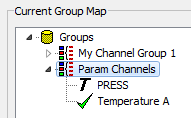
- In the current Proc Spec, add the channel group containing the parametric channels, and set the Analysis Type to Reference.

- Name of the channel group containing the parametric channels
- For analysis type Reference, the only reference channel available is Time, available reference units are % Time or Seconds.
Time History
This option is the main time domain analysis option, generating files which hold calibrated time series data spanning an event or manoeuvre. This option investigates all available input data, applying calibration and scaling factors in both the time domain and the frequency domain. In this way, any known linear or non-linear impulse response or frequency response in the measurement chain may be accounted for, provided that the response can be well described by either a 5th order polynomial function or by a table of up to 32 breakpoints.

1. The only available reference quantity for analysis type Time History is Time
2. Option for selecting one of the units available for the selected Reference Channel ( note: unit “seconds” represents the number of seconds from the start of the manoeuvre being analysed, and unit “% Time” is a percentage of the manoeuvre duration).
3. Analysis Frequency: For specifying the analysis bandwidth of interest.
4. Ref Limits: For specifying the reference range of interest. The reference limits will use the selected reference units (parameter 2)
Tacho Order Generation
The aim of tacho order generation is to perform a cross spectral analysis (CSA) with a real channel (AVM) and a synthesized channel derived from a tacho, but where all the energy/signal is at the EO of interest, such as is required for diametral mode identification. Tacho Order Generation method is only available in Proc Spec Editor.
To carry out a Tacho Order Generation processing job, do the following:
- The Group Map should contain a channel group listing the required tacho channel (from which the software will synthesize an engine order channel), and another channel group which includes the dynamic channel(s) required for cross-spectral analysis.

For generating a similar Group Map, refer to section Generating a Group Map.
- In the current Proc Spec, add the channel group containing the tacho channel and set the Analysis Type to Tacho Order Generation.
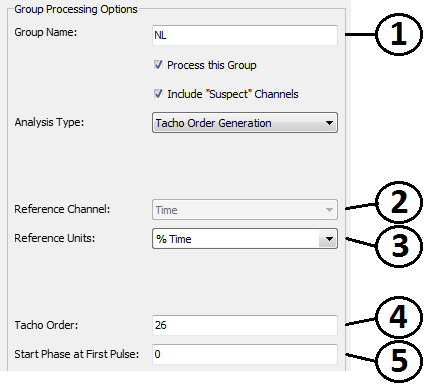
- Name of the Channel Group containing the tacho channel
- The only reference channel is Time
- Reference Units
- Option for entering the desired Engine Order
- Parameter for introducing a initial phase shift - allows the user to correct for the arbitrary start position of a revolution for a multi-tooth phonic wheel.
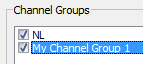
- In the current Proc Spec, add the channel group containing the dynamic channels, and set the Analysis Type to the desired ZMOD analysis (see section Standard Zmod or Advanced Zmod above for more details), and set the Output Type to Complex.
More Details on Tacho Order Generation
Real AVM channel
 Synthesised N1 for 26EO (this is what will be produced)
 What we produce is effectively a ZMod of a sine wave of varying frequency with respect to the shaft speed of interest.
The result of the synthesised channel is then used in a CSA.  Schematic of CSA results page.
How tacho order generation works.
Note : It works for OPR (Once per rev) and multi-tooth tacho

Perform FFT Analysis on synthesized RAW file.
Note: 'Phase at First Pulse' allows the user to correct for the arbitrary start position of a revolution for a multi-tooth phonic wheel.