
Hawk GUI: Channel and Unit Type Definition
Channel and Unit Type Definitions
Firstly, there are several predefined base channel types, with associated base units:
- Acceleration (m s-2)
- Velocity (m s-1)
- Displacement (m)
- Pressure (Pa)
- Temperature (K)
- Shaft (RPM)
- IRIG (s)
- Speech (Hz)
- Flow (kg s-1)
The user can customise the channel types by
- Defining new base types and associated base unit.
- Defining aliases for the base channel types
- Defining additional unit for each channel type, with conversion factor to the base unit.
Add Base Channel Types
This is done in the Configuration tab of the preferences screen.
 Create an Alias for a Base Channel Type
This is done in the Units tab of the preferences.
The user can define custom channel types, which are aliases to the base channel types already defined.
Adding a new channel type is achieved by selecting the Channel Types node in the tree view, with a left click. Then right click on the Channel Types node to bring up the popup menu.
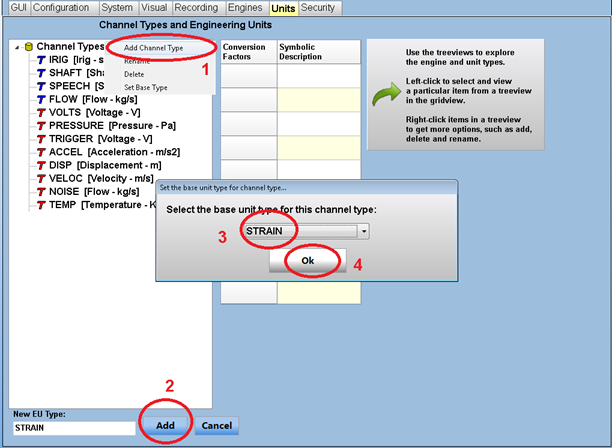
Note that the tree popup menu also allows renaming a channel type, deleting it, or changing its base type.
Define New Units
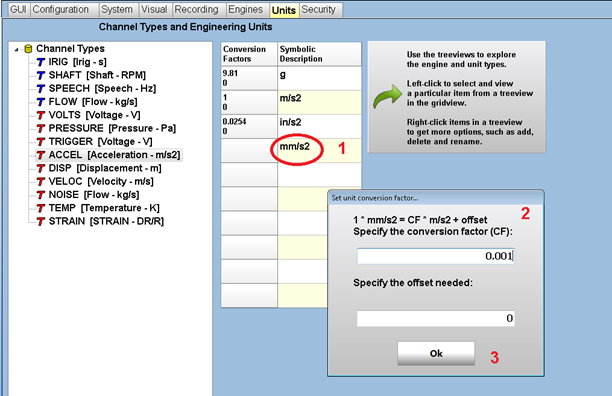
- Select the channel type
- Type in the new unit in the grid
- Press enter to bring up the unit conversion panel
- In the unit conversion panel, specify factor and offset to apply to the base unit, in order to convert to the newly defined unit. This will be used in the real-time screen when the user wishes to see the channel data in a different unit than the channel unit.
- Click Ok, the new unit will be in the grid, with associated factor / offset.
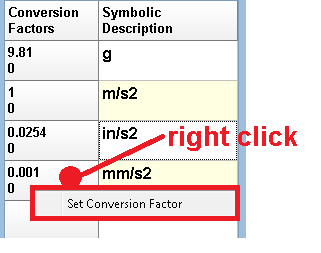
It is possible to modify the conversion afterwards by right clicking in the conversion factors cell.
IMPORTANT: The user is allowed of up to 10 units per channel type. Also, a unit name must be unique across all channel types (e.g. MPa cannot be defined for both pressure and strain).