
Hawkeye: Polar Instrument
Before using any values generated from the polar plot., ensure that the phase measurement is calculated correctly for the application. Depending on the application, phase values will be affected by different configuration setting. The most common settings are in Hawkeye Server where phase is set to be calculated as leading (-360 to 0 degrees) or lagging (0 to 360 degrees). Additionally, a fixed offset can be applied.
The default setting is leading with no offset.
The Polar / Bode component can be added to any RT Page from the Right-Hand Hawkeye slide-out menu and is found in the Order Tracking section. For the component to function, it requires that the reference (always a tachometer (speed)) channel and the target channel be acquired at the same sample rate.
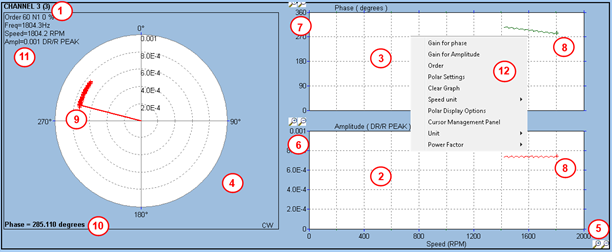
- Unlike the order track plot, the polar is a single-channel instrument, with the ability to display multiple tracked orders against various speed channels. Select a channel in the bar graph and drop it in the polar plot.
- Amplitude vs speed plot
- Phase vs speed plot
- Amplitude – Phase
- Speed scale, configurable via the “Polar settings” panel
- Amplitude scale configurable via the gain panel
- Phase scale, configurable via the gain panel
- Most recent point is highlighted with a cross
- Most recent point on the polar is highlighted by a line joining the point to the centre.
- Current phase value
- Indication about the order being tracked, current amplitude and current speed value.
- Mouse right click popup menu with access to gain panel for phase / amplitude and polar settings panel. Click on the “Order” option to setup the order(s) to track.
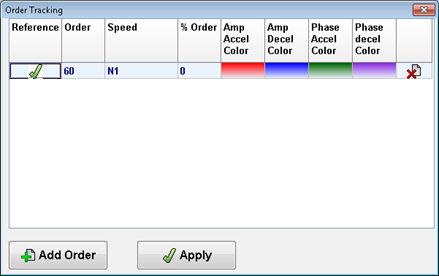
The panel above is similar to the one found in the Order Track instrument. Note the user can setup a colour for the trace when speed is going up and a different colour when speed is going down.
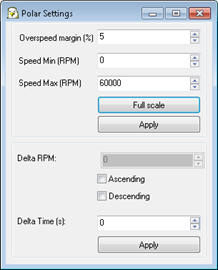
The polar setting panel will allow the user to setup the speed scale, and also the plot update rate. The base update rate is the update rate of the safety service (generally 5 updates per second). It is then possible to filter the points received and only display a point if the speed has changed by a given amount (Delta RPM), or the time elapsed since the last point accepted has gone over a given limit (Delta time).