
Hawkeye: Spectral Plot
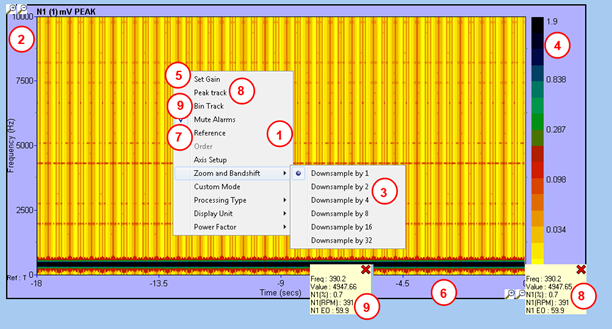
- The usual mouse right click popup menu
- Frequency scale
- Zoom in option on the frequency scale (see FFT plot)
- Amplitude colour scale, to encode FFT amplitude information. The colour scheme used can be changed through the preferences, where the user can load a colour map file of his choice.
- Gain panel, to change the false colour scale as a percentage of the full scale.
- Time scale, which is defined by the update rate. The Campbell has a fixed history size of 360 spectra, which equates to 18 seconds at an update rate of 20 Hz.
- Brings up the “Campbell reference panel”, to switch from time axis to speed axis
- Peak Sticky – attached to a specific point on the right edge of the Campbell (newest spectrum). This sticky attempts to follow the highest amplitude within a +/- 10 bin range of the clicked position and is particularly useful for monitoring order tracks.
- Bin Sticky – attached to a specific point on the Campbell. When reference is time, this sticky will move towards the left with the data it is attached to and will disappear when it reaches the left edge of the Campbell. This sticky is accessible via the “Bin Track” option in the popup menu. The bin tracked is the one pointed by the right click.
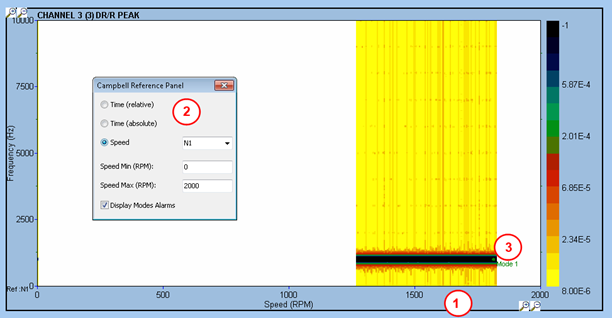
- Bottom axis is now speed, any new spectrum received is displayed against current speed. The FFT service has switched to speed reference for this channel, so a new FFT is computed every time the speed changes by more than speed range / 360. Therefore, no FFT will be computed if the speed is stationary.
- Panel to select the reference speed channel, and the speed range.
- Any mode defined for that channel and against that speed may be displayed (“Display mode alarms” check box in panel 2). The mode name is displayed on the newest spectra, at the mode frequency (for current speed value).
IMPORTANT: FFT reference (time / speed) is a processing parameter of the FFT service, on a per channel basis. Any FFT / Campbell instrument displaying this channel (which could be on a different screen, or even different computer) will be affected.