
Aurora: Tornado Shaft Mapping
Requirements: Aurora Analysis Version 3.10.1 or later
Tornado Shaft Mapping enables users with configurations containing more than three tachometers to manually assign a tacho to each shaft (N1, N2, and N3) as needed.
Rapid Processing

- In the Tornado tab of Aurora Client, navigate to the Manoeuvre of interest.
- Select the required channels.
- Choose the desired Processing Options.
-
Under Processing Options, check the Manual Shaft Mapping box This will reveal drop-down menus for N1, N2, and N3. Use these to assign the appropriate tachometers.
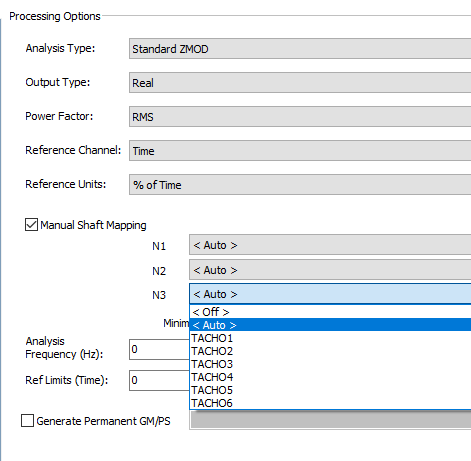
- When ready, click 'Add Jobs' at the bottom
Batch Processing
For Batch Processing, the primary difference lies in configuring the Proc Spec. Shaft mapping is performed differently than in the Tornado interface.

- Navigate to the Proc Spec Editor tab in Aurora Client
- Select the Proc Spec to change or Create a new one
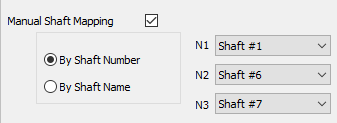
- Under Group Processing Options, check the Manual Shaft Mapping box. You will be given two mapping options:
-
By Shaft Number: Selects a tacho using the shaft number from HawkGUI.
-
By Shaft Name: Allows for 3 input options
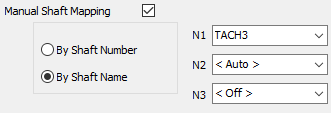
- Manually enter a tacho name
- Use < Auto > to select the first unassigned tacho in the HawkGUI tacho list
- Select OFF to skip mapping for that shaft
-
- Once all shafts are mapped, save the Proc Spec and apply it during batch processing.
