
Dragonfly Led Status
On the back of each of the Dragonfly Acquisition modules there are a series of LED's which identify current status of each Dragonfly.
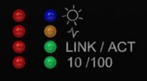
- Blue LED will indicate you that the Acquisition module is powered on.
- Green LED “LINK/ACT” will indicate the activity on the internal network.
- Red LED shows the acquisition status.
- The lower LED will flash saying the unit is “Idle”.
- Two lit LEDs indicate the unit is “Configured”.
- Three lit LEDs indicate the unit is running, but not sending data.
- Four lit LEDs show the unit is “Scanning”, or sending data to the CPU.