
HawkEye does not launch
It is likely that HawkEye did launch but has been minimized.
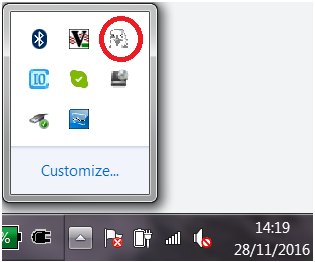
- Check the icon tray for HawkEye and right-click on it and click Restore. (You may need to Show Hidden Icons)
- You can always verify that HawkEye is launched by going to HGLSystemManager and clicking Show Details. There should be a green dot next to HawkEye. If not, verify that Suppress Application Restarts is unchecked.
- If it isn't showing on the list you can manually launch it by going to either the desktop or c:\hgl software and look for the program HawkEye.exe
- Lastly, if it is in the HGLSystemManager list but is appearing with a red dot next to it, it is possible that the networks are not correctly connected. Ensure that all networks are connected and restart the software.
